last-visit
Is it okay to go back yet? The map tells you in color.
You don’t want them thinking “here again,” so you stay away and end up switching shops instead. This app is for people like that.
Shops you haven’t been to yet show in top-priority green.
last-visit is currently available in Japan only, and the app is in Japanese. An English version is planned. We’ll announce it on X (posts are in Japanese).
Sound familiar?
- You only go on sale days, so the cashier already knows your face
- You worry they’ll think “here again,” so you skip it today
- You can’t remember when you last went to that shop
See the gap, and there’s nothing to hesitate over.
Was your last visit 3 days ago or 3 weeks ago? You stand in front of the shop without knowing, so you hesitate between going in and turning back. The longer it’s been, the less awkward it feels. So once you can see how long it’s been since your last visit, most of the hesitation goes away.
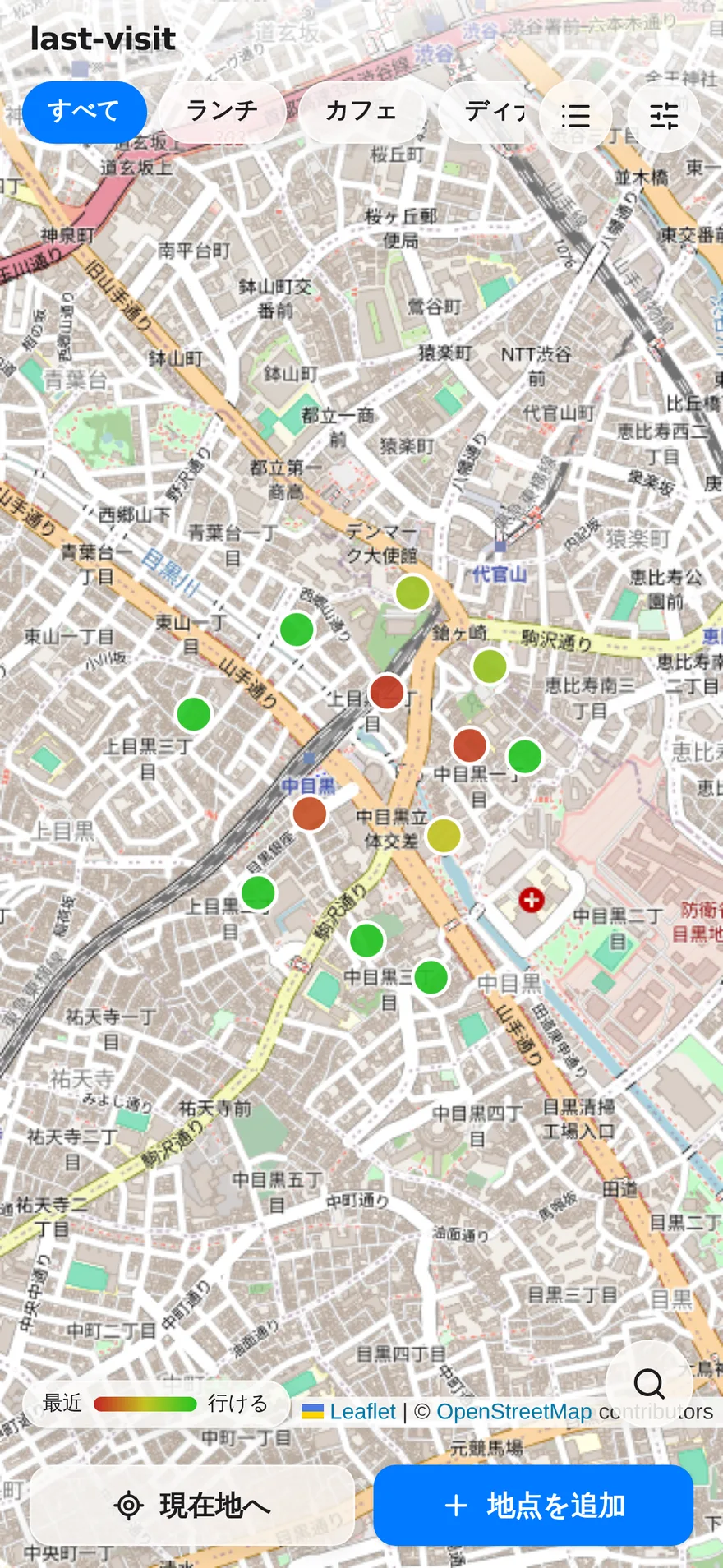
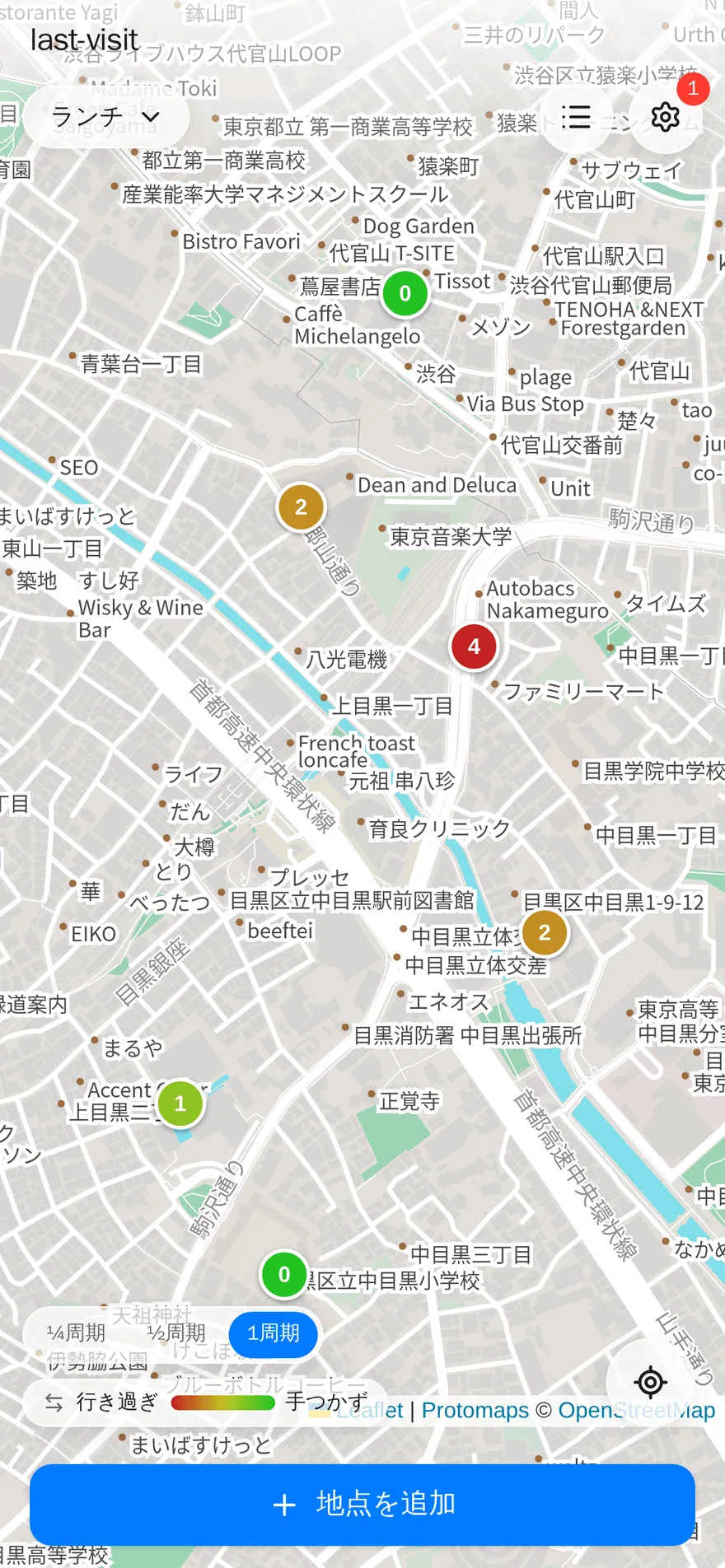
last-visit turns that gap into color on a map. Shops you went to recently are red; ones you haven’t been to in a while are green. You don’t need to remember the number of days: you can pick today’s shop by its color.
Avoiding places doesn’t help if there’s nowhere else to go. That’s why shops you’ve never been to show in top-priority green: you always have shops you can go to any time. When you run low, you can search the map you’re looking at and add more. You can share it with your partner, family or friends, too.
Screenshots
The less you hand over, the better
An app for people who don’t want their routines known would make no sense if it collected those routines. last-visit is built not to receive what it doesn’t need.
-
Works without location permission
The map, visit records and sharing all work without it. The only thing that disappears is the distance shown in “Nearby and due.”
-
Signing in doesn’t hand over your name or photo
You sign in with a Google or Apple account (no new password to create). All we receive is your email address and an account identifier issued by the provider you signed in with — not your name or profile picture. The identifier is used to tell whether you’re the same person, and the email address is kept so we can contact you.
-
No analytics tools in the app
No third-party analytics or behavior-tracking services (such as Google Analytics) are built in, and usage data isn’t sent to outside analytics companies. Server operation logs are still kept, though.
-
No ads
There are no plans to show third-party ads, including on the free plan. Usage data isn’t passed to third parties for advertising either.
-
Export your data any time
Your records are yours. If you decide to stop using the app, you can take everything with you.
Your location is read in only two situations: when you press the current-location button, and at launch if you’ve turned on the “Go to current location on open” setting (off by default). Coordinates go out to an outside service in only two cases, too: when you search for shops and when you open the registration screen. The “About location” page explains in detail when your location goes where.
About location How last-visit handles your locationFor the exact handling, see the privacy policy (Japanese). That is the official text.
Features
-
Colored by days since your last visit Shops you went to recently are red, ones you haven’t been to in a while are green. The days turn straight into color, so “next, I’ll go here” is clear at a glance. Shops you haven’t been to yet show in top-priority green.
-
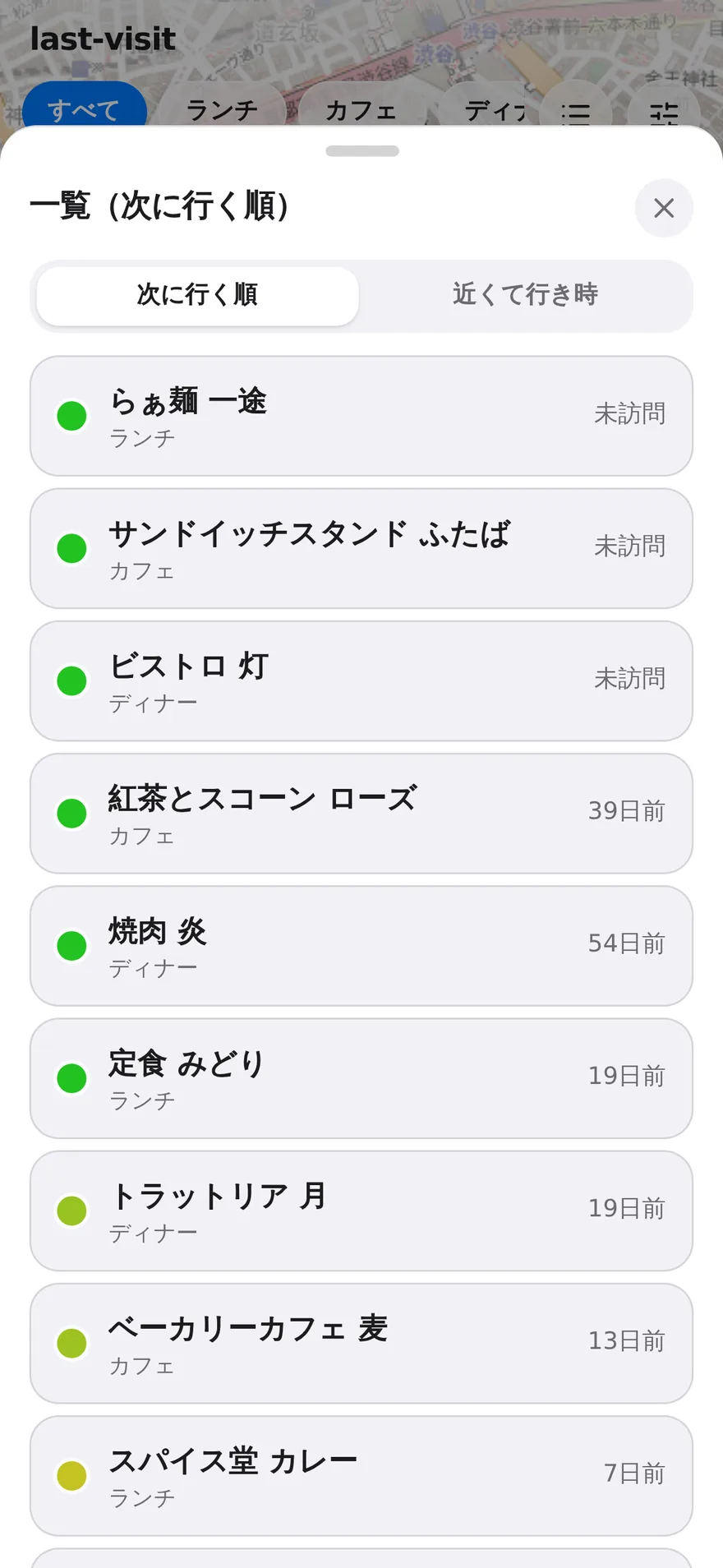
Next up / Nearby and due A “Next up” list ordered by how far past your chosen interval each shop is, plus “Nearby and due” suggestions from your current location (with distances).
-
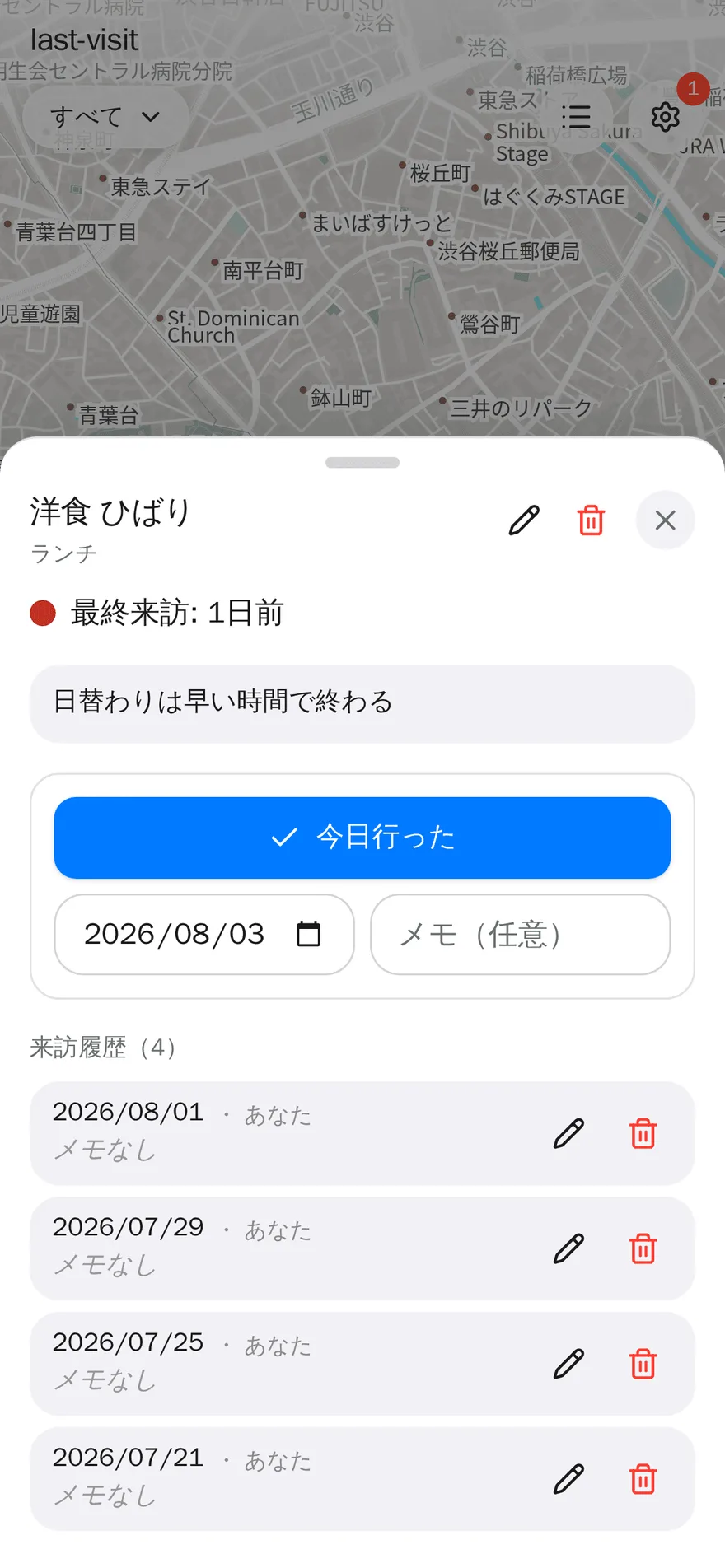
Record a visit in one tap One tap when you’ve been. You can also record past dates, check your history and delete individual entries.
-
Invite-and-approve sharing Share groups with your partner or friends and pool your visit records so you can make the rounds without overlap. You connect by user code, and sharing starts only once the other person approves. Even on the free plan, you can try sharing one group with one person.
-
Easy registration Add a place right away by tapping or long-pressing the map, or from your current location. The shop name is filled in automatically.
-
Search for shops in the area Search the visible area by category or shop name and register what you find. Opening status (open / closed / outside hours) is shown too.
-
A target interval for each group Set how often you want to rotate through each kind of shop (the target interval), and tune the rotation to your liking.
-
Record even without a signal Where there’s no reception, you can still register places and record visits. They show up on your device right away and are sent automatically when you’re back online. The number of unsent items appears at the top of the screen, so you can tell whether they’ve gone through.
-
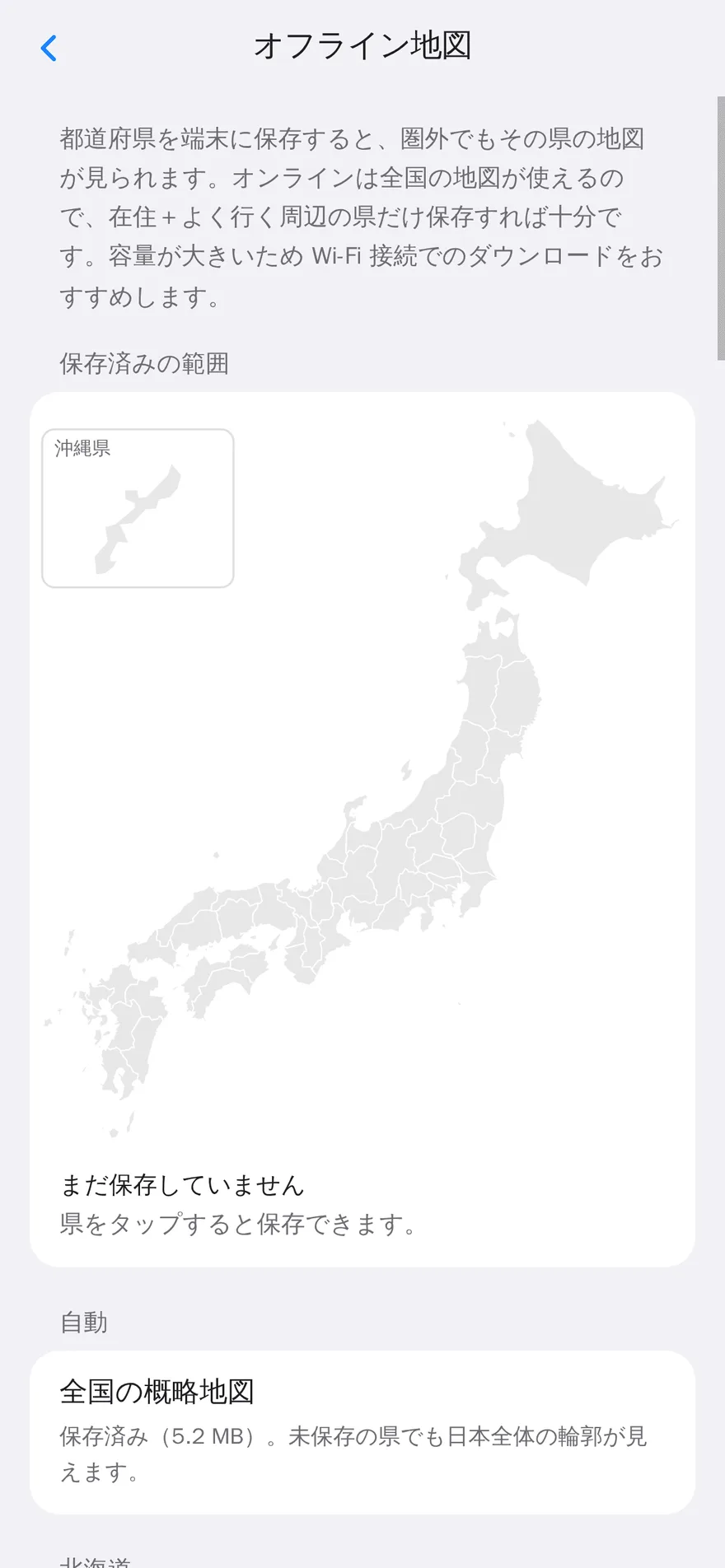
The map works offline, too A low-detail map of all of Japan is always on hand for free, so you won’t lose track of where you are without a signal. Detailed maps of the prefectures you visit often can be saved to your device with the paid plan. Prefectures you’ve saved stay viewable even if you stop paying later.
What the paid plan adds
Making the rounds works fully on the free plan. The paid plan is an add-on for people who want to rotate through many more shops. It’s a one-time purchase of ¥500 (tax included) for 90 days, with no auto-renewal.
-
Higher limits Up to 500 shops and 30 groups. Sharing expands to 5 groups with up to 5 people each (the free plan allows 15 shops, 3 groups, and sharing one group with one person).
-
Save detailed prefecture maps to your device Save detailed maps of the prefectures you visit often and view them offline. Saved prefectures stay viewable even after you stop paying.
-
Visit-count lens A view that shows, by the number of visits in a period, whether you’re going to the same shop too often. If the map’s colors show the gap, this shows the frequency.
Platforms and pricing
| Platforms | Web browser (add it to your home screen to use it like an app). On Android, you can install it from Google Play. Both are the same app inside. |
|---|---|
| Price | Free plan available. You can register up to 15 shops and 3 groups, and try sharing one group with one person. Offline recording and the low-detail map of all of Japan are free too. |
| Paid plan | A one-time purchase of ¥500 (tax included) for 90 days, with no auto-renewal. You get 500 shops and 30 groups, sharing with up to 5 people in each of 5 groups, saving detailed prefecture maps, and the visit-count lens (a view that shows, by the number of visits in a period, whether you’re going to the same shop too often). It isn’t unlimited. When the period ends, nothing you’ve recorded is deleted or hidden; you just can’t add new entries beyond the free plan’s limits. |
| Account | Sign in with a Google account or an Apple account (no need to create a new password) |
| Data | Stored in the cloud. Syncs across multiple devices and supports sharing. You can export the data you’ve registered at any time. |
| Location | Read when you press the current-location button, and at launch if you’ve turned on “Go to current location on open” (off by default). Each is a one-time reading; nothing is read in the background. It’s used to show your location on the map and to calculate distances for “Nearby and due.” Coordinates are sent to the place-search contractor in two cases: when you search for shops (the area shown on the map) and when you open the place registration screen (that place’s coordinates). Without permission, the map, records and sharing work as usual. |
FAQ
Can I use it for free?
Yes, on the free plan. You can register up to 15 shops and 3 groups, and try sharing one group with one person. Offline recording and the low-detail map of all of Japan are free too. The paid plan (¥500 for 90 days, tax included) gives you 500 shops, 30 groups, sharing with up to 5 people in each of 5 groups, saving detailed prefecture maps, and the visit-count lens (a view that shows whether you’re going to the same shop too often). It isn’t unlimited.
Can I use it for places other than restaurants?
Yes. Places like hair salons or chiropractors, where it’s easy to lose track of “when was the last time?” after a long gap, can be recorded on the map in the same way.
Do I need to create an account?
You sign in with a Google account or an Apple account. There’s no new ID or password to create. Signing in is needed to sync your data across devices and to share with your partner or friends.
Is my location tracked all the time?
No. Your location is read only when you press the current-location button, and when the app starts if you’ve turned on “Go to current location on open” (off by default). Each is a one-time reading, and after launch it isn’t updated until you press the current-location button. Nothing is read in the background. It’s used to show your location on the map and to calculate distances for “Nearby and due.”
Can I use it without allowing location access?
Yes. Registering shops, recording visits and sharing all work as usual; only the distances in “Nearby and due” become unavailable.
Is my location sent or stored anywhere?
Your location is never recorded continuously. Coordinates are saved only when you choose “Register from current location” and save it as a shop — just that one spot. Data is sent in two situations: when you search for shops, the area shown on the map is sent; when you open the place registration screen, that place’s coordinates are sent so the shop name and address can be filled in automatically. Both go to the place-search contractor. Your current location itself is never sent. However, if you search right after pressing “Go to current location,” the center of the area shown will be almost the same as where you are.
Can I share with my family or partner?
Yes. You invite them with a user code, and sharing only begins once they approve. You’ll never be connected without knowing.
Is there a smartphone app?
It’s offered as a web app, and on Android you can install it from Google Play. You can also add it to your home screen from the browser menu and use it like an app. Both are the same app inside.
Want to know when the English version is out?
For now, last-visit is in Japanese and available in Japan only. We’ll announce the English version on X (posts are in Japanese).
Other apps from the studio
These apps come from trust-delta, a one-person studio. One person makes them and runs them. About the studio
 Tekipaki Timer
A kitchen timer whose sounds tell you the cooking method
Tekipaki Timer
A kitchen timer whose sounds tell you the cooking method